The Donner N-32 MIDI keyboard review is for players who need a compact controller for learning, sketching ideas, or working with a DAW on the move.
Its 32 velocity-sensitive mini keys, built-in performance controls, and included teaching courses make it approachable, though it needs music software or an app to produce sound.
Donner N-32 Review Summary
The quick verdict
500+ ratings
Read Amazon ReviewsDonner N-32
A portable, feature-rich controller for beginners and mobile producers who want velocity-sensitive keys and hands-on MIDI tools.
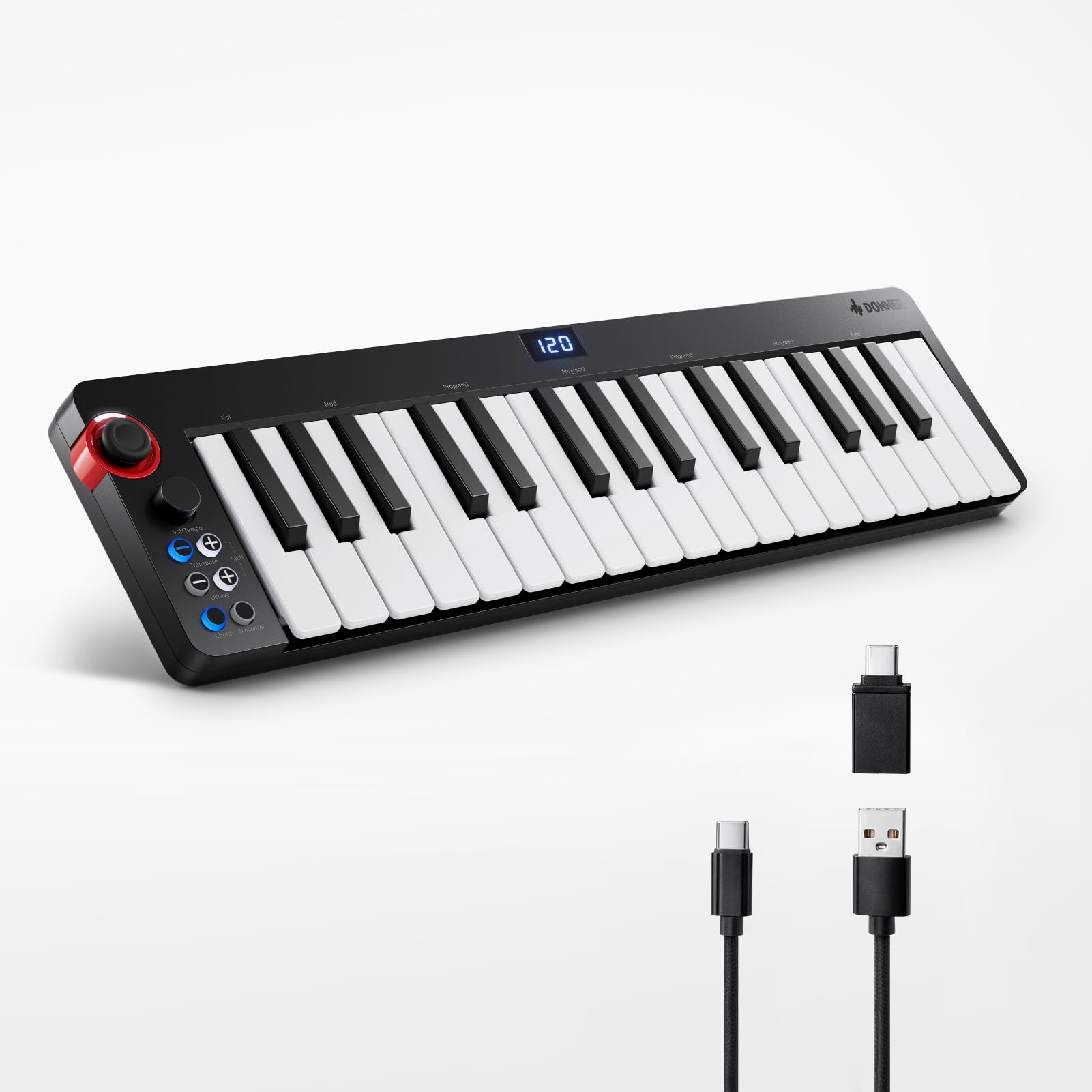
- 32 scaled-down, velocity-sensitive keys for MIDI performance.
- Digital display and four customizable banks for accessing controller functions.
- Chord arpeggiator, octave, pitch-shifter, sequencer, and sustain-pedal support.
- Light-up joystick-style wheel for pitch bend and modulation, with a breathing-light effect.

Pros
- Compact and lightweight for travel, limited desk space, or quick idea capture.
- Velocity-sensitive keys and several performance controls give it more flexibility than a basic MIDI key input.
Consider before buying
- The 32 scaled-down keys provide a shorter, smaller playing surface than a conventional full-size keyboard.
- It does not produce sound on its own; a compatible DAW or music app is required.
Read the full review summary
The N-32 combines a small keyboard with controls intended to support both practice and music production.
It has 32 scaled-down velocity-sensitive keys, a digital display, four customizable banks, and functions including a chord arpeggiator, octave controls, pitch shifting, a sequencer, and sustain-pedal support.
A light-up wheel provides pitch-bend and modulation control, while the compact, lightweight design is suited to taking it between a desk and other practice spaces.
This controller makes the most sense for beginners learning keyboard and arrangement basics, or producers who want a small MIDI input for a laptop, tablet, or phone.
The included 40 teaching courses add a learning angle, and USB connectivity supports use with several popular DAWs and mobile platforms.
Keep in mind that the N-32 is a controller: you need compatible music software or an app to hear sound, and its 32 mini keys offer less playing range than a full-size keyboard.
The buying factors
Donner N-32 Scorecard
Editorial scores reflect listed features and buyer fit; they are not laboratory measurements or customer ratings.
Portability
The compact, lightweight design and USB connection suit mobile composing and small workspaces.
Key range
Thirty-two velocity-sensitive mini keys provide a useful starting range, but limit reach for two-handed parts.
Hands-on controls
The wheel, display, four customizable banks, and listed performance functions offer several ways to shape MIDI input.
Beginner support
Forty teaching courses give new players structured material alongside the controller.
Software flexibility
The product is described as compatible with several major DAWs and Android, iOS, Mac, and Windows.
Standalone use
It requires a DAW or music app to produce sound, so it is not a self-contained keyboard instrument.
Key Features and Specifications of Donner N-32
- 32 scaled-down, velocity-sensitive keys for MIDI performance.
- Digital display and four customizable banks for accessing controller functions.
- Chord arpeggiator, octave, pitch-shifter, sequencer, and sustain-pedal support.
- Light-up joystick-style wheel for pitch bend and modulation, with a breathing-light effect.
- USB-MIDI connection and Type-C cable; described as plug-and-play with Mac or PC without a driver installation.
- Compatibility described for Cubase LE, Ableton Live, Logic Pro, Pro Tools, Studio One, and other DAWs, plus Android, iOS, Mac, and Windows.
- Includes 40 keyboard-teaching courses and music-production software.
Pros and Cons of Donner N-32
Pros
- Compact and lightweight for travel, limited desk space, or quick idea capture.
- Velocity-sensitive keys and several performance controls give it more flexibility than a basic MIDI key input.
- Teaching courses offer a useful starting point for beginners exploring keyboard and arrangement.
- USB connectivity and broad stated platform support make it a plausible fit for a mixed-device setup.
Consider before buying
- The 32 scaled-down keys provide a shorter, smaller playing surface than a conventional full-size keyboard.
- It does not produce sound on its own; a compatible DAW or music app is required.
- Buyers should confirm that their preferred DAW and device support the intended USB connection and workflow before relying on it.
Who Should Buy Donner N-32?
Good fit
Consider the Donner N-32 if portability matters more than having a wide keyboard range.
Its small footprint, velocity-sensitive keys, and controls for octave changes, pitch, modulation, chords, and sequencing give beginners and mobile producers several ways to enter ideas without setting up a larger controller.
It is also worth considering for a new learner who would use the included 40 courses.
The teaching material and compact format can make it easier to practice alongside a computer or mobile device, while the programmable banks offer room to organize controls around a preferred workflow.
Before buying, make sure you have a compatible DAW or music app and that your device can connect over USB as intended.
If you plan to play broad two-handed parts or want a keyboard that makes sound without software, the N-32’s core design may not match your routine.
Who should skip it
Skip this model if you need a standalone instrument with built-in sound. The N-32 sends MIDI and depends on a DAW or music app for audio.
Look elsewhere if you regularly need a wider keyboard range or full-size keys for extended performance. Its 32 scaled-down keys prioritize compactness over playing space.
How the Donner N-32 Fits a Compact MIDI Setup
A small keybed for mobile work
Thirty-two scaled-down keys keep the controller compact and make it easier to place beside a laptop or pack for travel.
That layout can work well for short melodies, chords, and idea capture; players who depend on a broader range may need to change octaves more often or choose a larger controller.
Controls for shaping a performance
The N-32 groups several useful MIDI functions into its control surface: a chord arpeggiator, octave and pitch-shifting controls, a sequencer, sustain-pedal support, and a wheel for pitch bend and modulation.
The display and four customizable banks are intended to help organize those functions, while the wheel’s breathing light adds a visual cue during use.
Learning and software workflow
The included 40 courses give beginners a structured way to explore keyboard and arrangement concepts.
The controller is described as working with major DAWs and mobile and desktop platforms, and as connecting to Mac or PC over USB without driver installation.
Check the requirements of your chosen software and device before purchase, especially if you plan to compose on a phone or tablet.
A controller, not a sound source
The N-32 sends MIDI rather than producing sound by itself. That makes it a fit for buyers who already use, or are ready to choose, a DAW or music app with instruments and sounds.
If you want to sit down and play without opening software, this design calls for a different kind of keyboard.
Alternatives to Donner N-32
Computer Recording MIDI Controllers alternative
400+ ratings
Read Amazon ReviewsDonner STARRYPAD MIDI Pad Controller
Choose the N-32 when you want piano-style MIDI input and keyboard lessons.
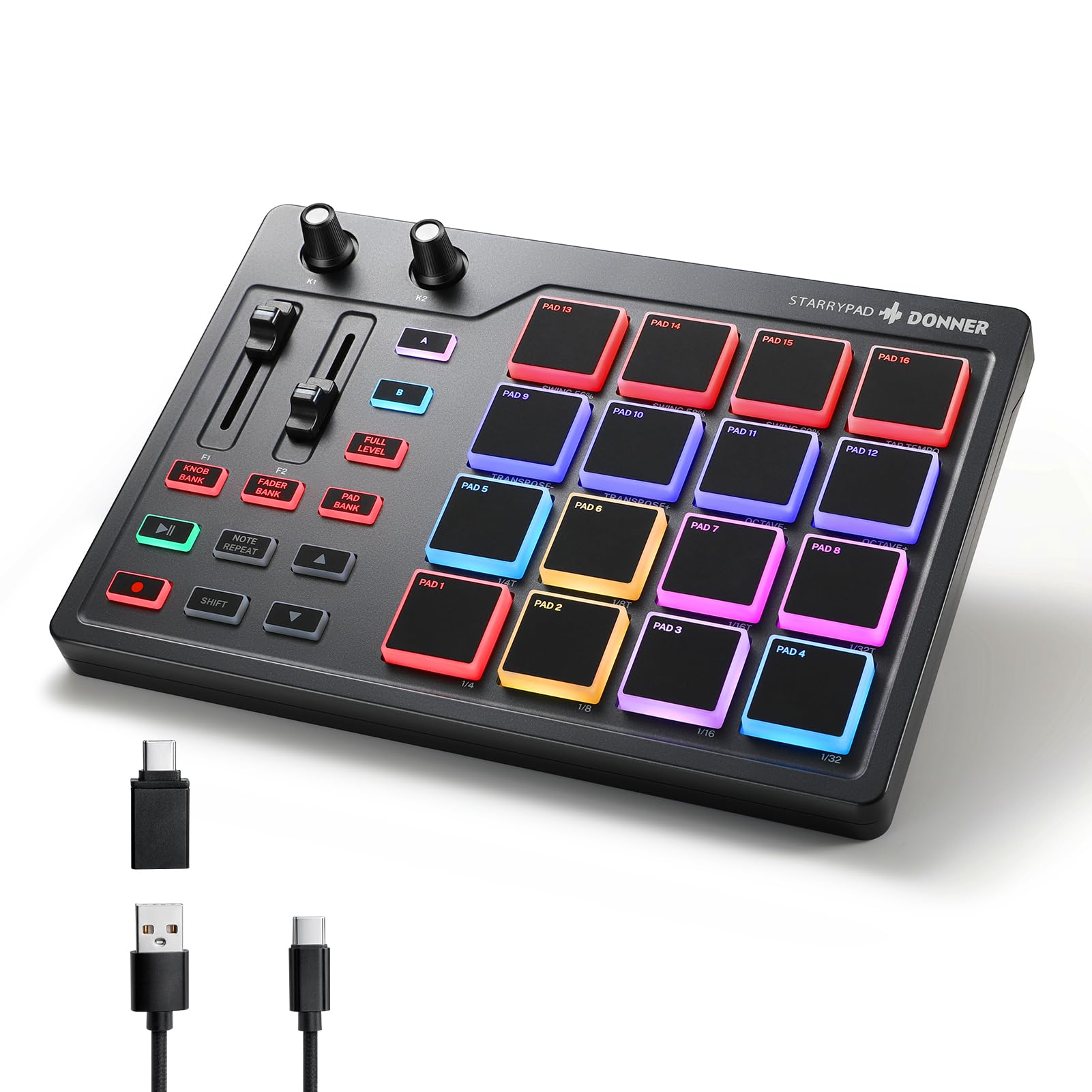
The STARRYPAD is the more relevant fit when your workflow centers on finger-drumming, sample triggering, and assigning controls to a DAW; it is also a MIDI controller and needs software to sound.
- The STARRYPAD uses 16 backlit silicone pads, with three banks for up to 48 assignable pads, plus two faders, two knobs, and three buttons.
- It is designed for triggering drums, samples, and effects, and includes Melodics courses and Cubase LE software.
- The N-32 is built around 32 velocity-sensitive mini keys and keyboard-focused controls for melody, chords, and learning.
Is Donner N-32 Worth It?
The Donner N-32 is worth considering as an entry-level, portable MIDI keyboard for learning, sketching, and compact DAW setups. Its 32 velocity-sensitive keys, useful control functions, and included courses make a well-rounded feature set for that role.
Buy it if small size and software-based music making fit your routine. Choose another kind of keyboard if you need standalone sound, full-size keys, or a wider playing range.
Your review at a glance
500+ ratings
Read Amazon ReviewsDonner N-32
A portable, feature-rich controller for beginners and mobile producers who want velocity-sensitive keys and hands-on MIDI tools.
- 32 scaled-down, velocity-sensitive keys for MIDI performance.
- Digital display and four customizable banks for accessing controller functions.
- Chord arpeggiator, octave, pitch-shifter, sequencer, and sustain-pedal support.
- Light-up joystick-style wheel for pitch bend and modulation, with a breathing-light effect.