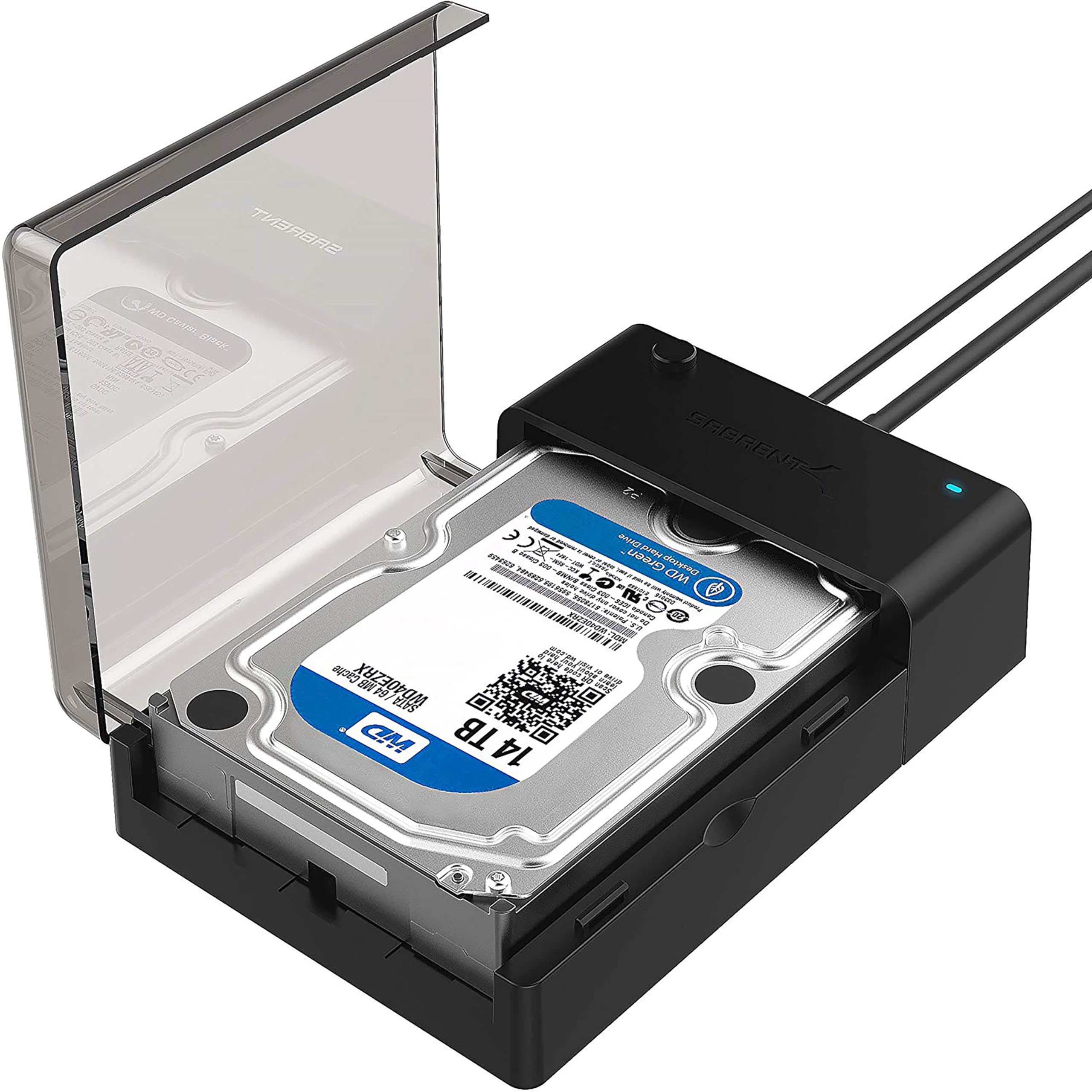
The SABRENT EC-DFLT is a straightforward way to connect a loose SATA hard drive or SSD to a computer for file access, transfers, and drive maintenance.
This sabrent hard drive docking station review focuses on its broad SATA support, direct USB 3.0 connection, and the power and compatibility details buyers should check.
SABRENT EC-DFLT Review Summary
The quick verdict
37,000+ ratings
Read Amazon ReviewsSABRENT EC-DFLT Lay-Flat Docking Station
A practical choice for anyone who needs occasional USB access to 2.5- or 3.5-inch SATA drives without installing them inside a computer.
- Accepts 2.5- and 3.5-inch SATA HDDs and SSDs, including SATA I, II, and III drives.
- Connects to a computer with USB 3.0 Type-A; a host cable is included.
- Supports UASP when paired with a UASP-capable host system.
- Offers plug-and-play operation on Windows 10 and 11, macOS, and Linux, with no driver installation required.

Pros
- Works with both common 2.5-inch and 3.5-inch SATA drive sizes, including HDDs and SSDs.
- Broad operating-system support and plug-and-play setup make occasional file access uncomplicated.
Consider before buying
- It supports SATA drives only; buyers with IDE/PATA, M.2 NVMe, M.2 SATA, SAS, or USB-connected drives need another solution.
- A computer USB 3.0 port is recommended for stable operation; hubs and USB 2.0 ports may lead to intermittent disconnections.
Read the full review summary
This lay-flat dock supports 2.5- and 3.5-inch SATA I, II, and III hard drives and SSDs, with plug-and-play operation on Windows 10 and 11, macOS, and Linux.
Its USB Type-A connection and included host cable keep setup simple, while UASP support can help transfers on compatible computers. A 12V adapter is included, and 3.5-inch drives require that external power to spin up.
The EC-DFLT suits people who occasionally connect bare SATA drives for retrieving files, moving data, or working with a spare disk.
Its one-drive-at-a-time, open dock design is convenient for quick swaps; buyers looking for a multi-drive workspace, offline cloning, or support for M.2 and other non-SATA drives should consider their needs carefully.
The buying factors
SABRENT EC-DFLT Scorecard
Editorial scores reflect listed features and buyer fit; they are not laboratory measurements or customer ratings.
SATA drive compatibility
Supports 2.5- and 3.5-inch SATA I, II, and III HDDs and SSDs, but not non-SATA formats.
Setup simplicity
Plug-and-play use across Windows, macOS, and Linux avoids a driver installation step.
USB connection
USB 3.0 Type-A with UASP support is a practical host interface, provided the computer supports UASP for that benefit.
Power flexibility
The included 12V adapter covers 3.5-inch drives; 2.5-inch drives are generally bus-powered, with the adapter recommended for stability.
Drive swapping
Hot-swappable operation and an activity LED are useful for intermittent access to different drives.
Diagnostic access
S.M.A.R.T. diagnostics are not supported through the USB bridge, which matters for users who want drive-health information.
Key Features and Specifications of SABRENT EC-DFLT
- Accepts 2.5- and 3.5-inch SATA HDDs and SSDs, including SATA I, II, and III drives.
- Connects to a computer with USB 3.0 Type-A; a host cable is included.
- Supports UASP when paired with a UASP-capable host system.
- Offers plug-and-play operation on Windows 10 and 11, macOS, and Linux, with no driver installation required.
- Supports hot-swapping and includes an LED activity indicator.
- Includes a 12V power adapter; 3.5-inch drives require external power, while 2.5-inch drives are generally bus-powered.
Pros and Cons of SABRENT EC-DFLT
Pros
- Works with both common 2.5-inch and 3.5-inch SATA drive sizes, including HDDs and SSDs.
- Broad operating-system support and plug-and-play setup make occasional file access uncomplicated.
- UASP support gives compatible computers a protocol option designed for faster transfers.
- The included adapter addresses the power needs of 3.5-inch drives.
Consider before buying
- It supports SATA drives only; buyers with IDE/PATA, M.2 NVMe, M.2 SATA, SAS, or USB-connected drives need another solution.
- A computer USB 3.0 port is recommended for stable operation; hubs and USB 2.0 ports may lead to intermittent disconnections.
- S.M.A.R.T. diagnostics are unavailable through the USB bridge, so this is not a complete drive-health checking setup.
- The dock handles a single drive at a time and does not list offline cloning as a feature.
Who Should Buy SABRENT EC-DFLT?
Good fit
Consider the EC-DFLT if your main task is connecting a loose 2.5- or 3.5-inch SATA drive to a computer without opening the computer case.
The broad SATA generation support, common operating-system compatibility, and no-driver setup make it a handy utility for occasional file retrieval or transfers.
It is also a reasonable fit for a small repair or migration toolkit when you already know the drive uses SATA. For a 3.5-inch disk, plan to use the included 12V adapter and a wall outlet.
For best results, connect the supplied USB Type-A cable directly to a USB 3.0 port rather than relying on a hub.
Who should skip it
Skip this model if your drives use M.2 NVMe, M.2 SATA, IDE/PATA, SAS, or a USB enclosure connection. Confirm the drive interface before buying, especially with high-capacity enterprise disks, since compatibility may have limitations.
It is also a poor fit for a desk setup that needs two or more drives connected at once, computer-free cloning, or S.M.A.R.T. diagnostics through the dock. Its purpose is direct access to an individual SATA drive.
How the SABRENT EC-DFLT Fits a SATA Drive Workflow
SATA-only compatibility is the key buying check
The dock’s compatibility covers 2.5- and 3.5-inch SATA I/II/III drives, so it can serve several generations and sizes of conventional SATA storage.
The interface matters more than the drive’s physical size: M.2 SATA and M.2 NVMe are both outside the supported list, as are IDE/PATA and SAS.
Check the drive connector and protocol before purchasing, and verify compatibility if using a high-capacity enterprise model.
Power depends on the drive size
A 3.5-inch HDD needs more than a USB connection, so the included 12V adapter is required for it to spin up and remain connected.
Many 2.5-inch drives can draw power from USB, although the adapter is recommended for stability.
This makes the dock usable across both sizes, but buyers should account for the adapter and an available outlet when using larger desktop drives.
USB 3.0 and UASP shape transfer expectations
The USB 3.0 Type-A host connection is intended for direct attachment to a computer, and UASP support may improve transfer handling when the host also supports the protocol.
The product description gives typical HDD transfer speeds of 100–160 MB/s, while SSD speeds vary; these are context, not a guarantee for every drive or computer.
A direct USB 3.0 port is recommended, since USB hubs and USB 2.0 ports may cause intermittent disconnections.
A useful access dock, with a defined role
Hot-swapping and an activity LED suit occasional work with individual drives, such as retrieving files from a spare disk or moving data between storage devices.
But the USB bridge does not support S.M.A.R.T. diagnostics, and the feature set does not include offline cloning. Buyers who need drive-health tools, simultaneous multi-drive access, or computer-free duplication should choose a dock designed around those tasks.
Alternatives to SABRENT EC-DFLT
Hard Drive Docking Stations alternative

17,000+ ratings
Read Amazon ReviewsSABRENT EC-HD2B Dual-Bay SATA Docking Station and Cloner
Choose the EC-DFLT for straightforward access to one drive at a time. The EC-HD2B is a better match when two-bay access or offline cloning is central to the task.
- The EC-HD2B accepts two 2.5- or 3.5-inch SATA drives and supports offline cloning, as well as computer-connected transfers over USB 3.0.
- The EC-DFLT is a single-drive lay-flat dock for direct computer access to a SATA HDD or SSD, with UASP support on a compatible host.
Hard Drive Docking Stations alternative

1,000+ ratings
Read Amazon ReviewsSABRENT EC-CH2B Dual-Bay USB-C SATA Docking Station
The EC-DFLT fits a simpler single-drive workflow. Consider the EC-CH2B if you want to work with two SATA drives at once or need offline cloning, and make sure its USB Type-C connection suits your computer.
- The EC-CH2B is a dual-bay SATA dock with USB Type-C, simultaneous read and write access to two drives, hot-swapping, and offline cloning.
- The EC-DFLT connects one SATA drive to a computer over USB 3.0 Type-A and does not list offline cloning.
Is SABRENT EC-DFLT Worth It?
The SABRENT EC-DFLT is worth considering for simple, occasional access to 2.5- or 3.5-inch SATA drives. It combines broad SATA generation support, plug-and-play operation, an included power adapter, and UASP support in a focused single-drive dock.
Before buying, confirm that your drive is SATA, plan for external power with a 3.5-inch disk, and use a direct USB 3.0 port.
If your routine calls for cloning, multiple drives at once, or S.M.A.R.T. diagnostics, this model’s feature set may not cover it.
Your review at a glance
37,000+ ratings
Read Amazon ReviewsSABRENT EC-DFLT Lay-Flat Docking Station
A practical choice for anyone who needs occasional USB access to 2.5- or 3.5-inch SATA drives without installing them inside a computer.
- Accepts 2.5- and 3.5-inch SATA HDDs and SSDs, including SATA I, II, and III drives.
- Connects to a computer with USB 3.0 Type-A; a host cable is included.
- Supports UASP when paired with a UASP-capable host system.
- Offers plug-and-play operation on Windows 10 and 11, macOS, and Linux, with no driver installation required.